First import
Quick Start
PSD to UMG
The fastest path from a structured PSD to a working generated Widget Blueprint.
Installation check
Before importing in Unreal
| Setup item | What users need to know |
|---|---|
| Supported Unreal versions | UI Widget Builder supports UE 5.6, 5.7, and 5.8. |
| Animated Widget Switcher | To use Change to Common Animated Switcher, enable the Unreal CommonUI plugin first. Normal WidgetSwitcher import does not require CommonUI. |
| Preset path | The importer can save the preset path, so repeated imports can reuse the same preset location faster. |
✓
Install details
For full setup steps, see the Installation page.
First import
Quick start checklist
Use this flow when testing the plugin for the first time or when making a tutorial video.
-
1
Prepare Photoshop. Put each screen inside a root group. The CAN_ prefix is optional: CAN_MainMenu and plain names like MainMenu, Settings, or Loading are all valid.
-
2
Name controls. Use prefixes like BTN_Play, TXT_Title, IMG_Background, and SLD_Volume.
-
3
Run Prep Layers. It finds visible text/image layers with missing prefixes and lets you rename them quickly.
-
4
Run Fill States. For each BTN_ group, create missing
IMG_Normal,IMG_Hover, andIMG_Pressedlayers. -
5
Export PSD. Choose an output folder. The exporter writes
layout.jsonandTextures/. -
6
Import in Unreal. Open UI Widget Builder, choose the exported folder, review Step 2/Step 3 settings, then import.
-
7
Test in PIE. If Add To Level is enabled, the plugin can generate level Blueprint logic to create the selected widget on BeginPlay.
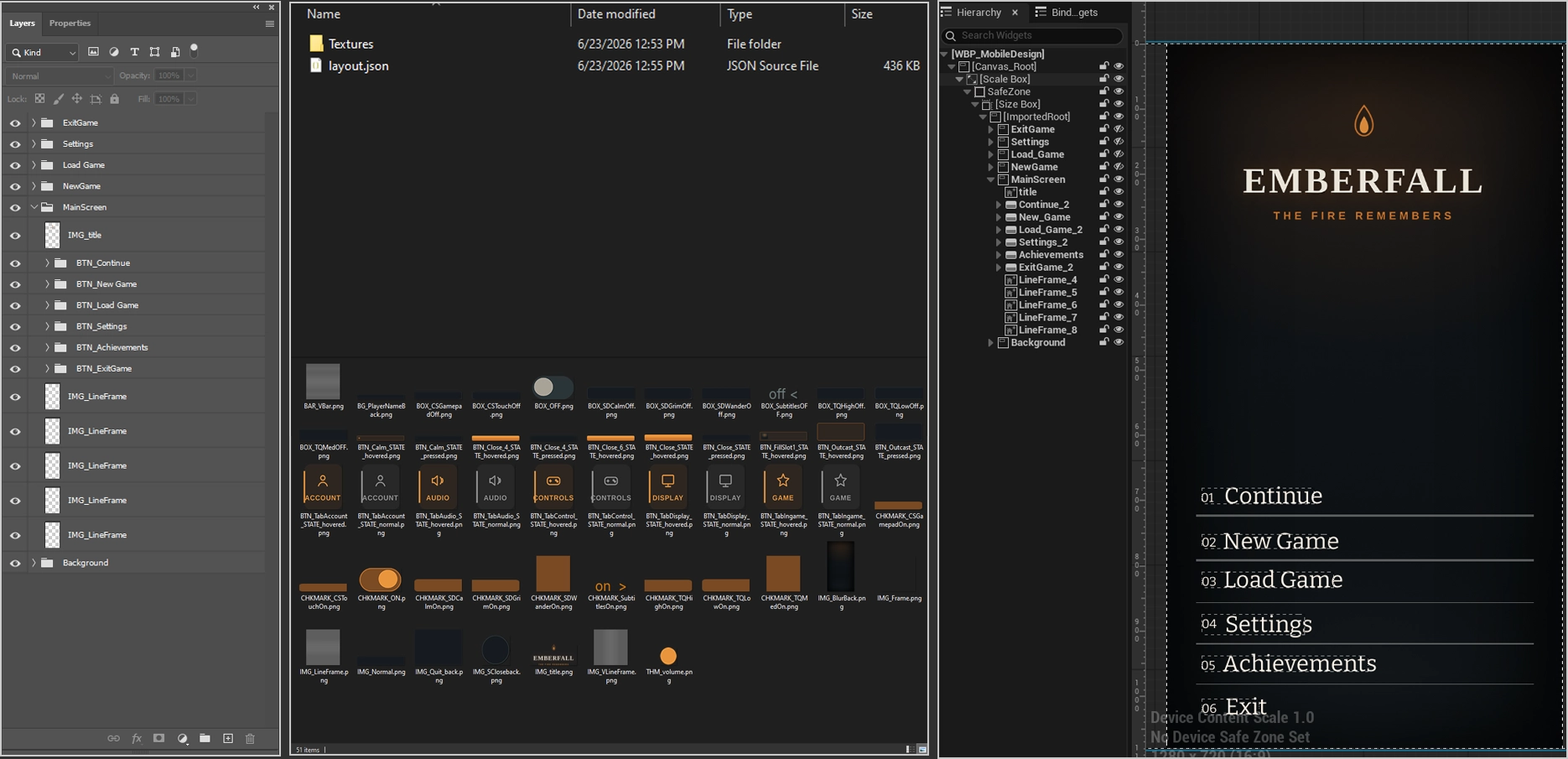
left Photoshop layer tree, center export folder, right Unreal UMG preview.
Recommended first PSD
Small example structure
MainMenu
  IMG_Background
  TXT_Title
  BTN_Play
    IMG_Normal
    IMG_Hover
    IMG_Pressed
    TXT_Label
  BTN_Settings
    IMG_Normal
    IMG_Hover
    IMG_Pressed
  Settings
    IMG_Panel
    TXT_SettingsTitle
    SLD_MasterVolume
      BAR_Track
      THM_Handle
    BTN_Close
      IMG_Normal
      IMG_Hover
      IMG_Pressed
✓
Tip
For a clean first test, keep the PSD small. Verify text, buttons, one image, one slider, and one close button before testing advanced screens.
Clean re-import
When to enable delete-before-import
During iteration, generated assets may already exist in the Unreal Content path. Use Delete existing generated items before import when you want a fully clean import.
| Situation | Recommended action |
|---|---|
| First import | Leave it off. There is nothing to delete. |
| Re-import after changing PSD structure | Enable it to remove old generated widgets and the generated Textures folder first. |
| Existing assets found and option is off | The importer asks whether to delete first and continue, or cancel. |
| Widget Blueprint is open in editor | Close the open Widget Blueprint tab before deleting generated items. |